


Free Photoshop Pencil Brushes


I do all my artwork from start to finish in Photoshop. It’s a very powerful program and overall I enjoy using it. But I’ve never been thrilled with Photoshop’s brushes.

There’s nothing in Photoshop that does a good job simulating the look and feel of a real-world graphite pencil. Painter and Sketchbook Pro are have pretty good pencil brushes, but I’m so used to Photoshop that I don’t really want to go to the trouble and expense of learning a new program. Instead, to simulate pencil I’ve been using the standard hard-brush tool in Photoshop with the opacity set to 30%. That way I get a thin gray line that I can build up with pressure and crosshatching. For rough sketching it gets the job done but it’s really not the same thing. The results are satisfactory at best.
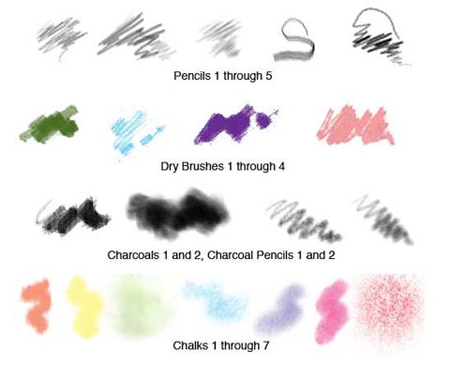
 

pencil  brushes


Then I discovered these Photoshop brushes (Nagel Series 33) from Dave Nagel at CreativeMac.com that do a pretty good job of simulating graphite and chalk. I’ve only had a little time to play around with them and have yet to try them on a client project, but so far I really like them. It’s a huge improvement over anything that comes standard with Photoshop. My favorite is an 11-point brush called NagelSeries33-CharcoalPencil1. I used it to sketch the doodle up above. The texture looks like a lot like graphite, and you can get a nice range of dark-to-light simply by pressing harder with the Wacom stylus. I think I’ll be using it a lot.

And best of all, the brushes are free. You can download the brushes and get instructions on how to install them here.


Digg!

32 Responses to Free Photoshop Pencil Brushes

  1. scarlettred
    - January 22, 2008 Reply

    Thanks! I am a brush slut!

    • gs0
      - November 12, 2009 Reply

      Haha epic description

    • scuff
      - November 13, 2009 Reply

      LOOOOOOOL, you are my hero <33

  2. Amanda
    - January 22, 2008 Reply

    Awesome! Thanks for the link Cedric.

    I’ve tried them out and there’s a couple of brushes that I really like! Will be adding them to the favourite brushes file :)

  3. Mike Dashow
    - January 22, 2008 Reply

    Really useful link, Cedric. Thanks for posting it!

  4. Sergio
    - January 24, 2008 Reply

    great resource cedric, thanks!!

  5. Jennifer
    - January 26, 2008 Reply

    I installed the pencil brushes that you recommended and tried them out yesterday. LOVE them!!!! Thank you!

  6. Pingback: 9042 - 9038 « The Scotto Grotto

  7. Joe Sciglitano
    - January 31, 2008 Reply

    Awesome! Thanks Cedric.

  8. Photoshop 7.0 Brushes
    - March 25, 2008 Reply

    Nice brush! If you are a real Photoshop brush addict (like me), here is another hint, 42 free hi-res brush sets at http://graphics-illustrations.com Enjoy!

  9. george
    - March 30, 2008 Reply

    take a look at my site…its new but it gets updated every day : )

    http://www.photoshoptutorialssite.com/Home.html

  10. Alegouk
    - June 7, 2008 Reply

    Thanks for that, it has stopped years of fruitless experiment
    they are exellant

  11. Pingback: Strange Pencil « Wellgoncho

  12. Hello
    - February 13, 2009 Reply

    Really Thanks man ;)

  13. Jon
    - April 15, 2009 Reply

    Hey Cedric. Jon from Mojo Solo here. Just happened across you site (#1 result for Photoshop Pencil Brushes) — thanks for sharing. Great job on the blog.

  14. Cesar Mujica
    - June 5, 2009 Reply

    I was looking for something like this. Really helpful for my sketches.

    http://3dimentional.wordpress.com

  15. johnny covarrubias
    - December 9, 2009 Reply

    I am 13yrs old. I love to draw. One day I would like to be a cartoon artist.

  16. johnny covarrubias
    - December 9, 2009 Reply

    I am 13 yrs old. I love to draw One day i would love to be a cartoon artist. I would like information in how to become a cartoon artist.

  17. rei
    - January 7, 2010 Reply

    thanks ‘;d

  18. Jack
    - February 3, 2010 Reply

    Any one knows what kind of brush, Bob Staake in his works?

    Thanks in adv.

  19. Jack
    - February 3, 2010 Reply

    and big thanks to this brushes m/

  20. Makeup DIY
    - February 4, 2010 Reply

    Hey darling, great website! I genuinely like this post.. I was curious about this for a long time now. This cleared a lot up for me! Do you have a rss feed that I can add?

  21. fsdf
    - March 14, 2010 Reply

    Hey A hoe where are the brushes

  22. Frederik
    - August 19, 2010 Reply

    many thx !

  23. eflan
    - October 2, 2010 Reply

    for a long time I ‘ve been searching brushes like these. thanks a lot

  24. Adhi
    - October 8, 2010 Reply

    Nice useful article keep posting like this.. Thanks for sharing this info.
    My Blog

  25. paipure
    - January 5, 2011 Reply

    thank you ขอบคุณมากครับ

  26. Molly
    - February 13, 2011 Reply

    love love love love love
    thank you thank you thank you

  27. asd
    - March 13, 2011 Reply

    thaaaaaaaaaaaaaaaaaaaankx

  28. Pingback: Sketchbook Podcast 1 – Humble Beginnings | The Sketchbook Podcast

  29. Pingback: How to draw the human eye – a study with digital pencils using Photoshop CS5 extended « StratoArt Blog

  30. Pingback: Style: Finding one that suits the story « Stoodemo

Leave a Reply